Choose to view the demo for:
This page uses power consumption data from Electricity Maps to determine if the clean power sources used on your the energy grid in your location are over certain value. Based on that, some of the design and content loaded by this page will change.
You're seeing the page in light mode, which means either your local electricity grid is using more than 50% renewable energy, or that no data was available for your region.
You're also seeing a custom font (Depature Mono) used on this page.
This page has been modified based on the below data:
This page uses the grid-aware-websites code library to get the current energy grid data from Electricity Maps. Based on the response, it will either return the regular site, or modify parts of the site to apply some low-impact web design practices (explained above).
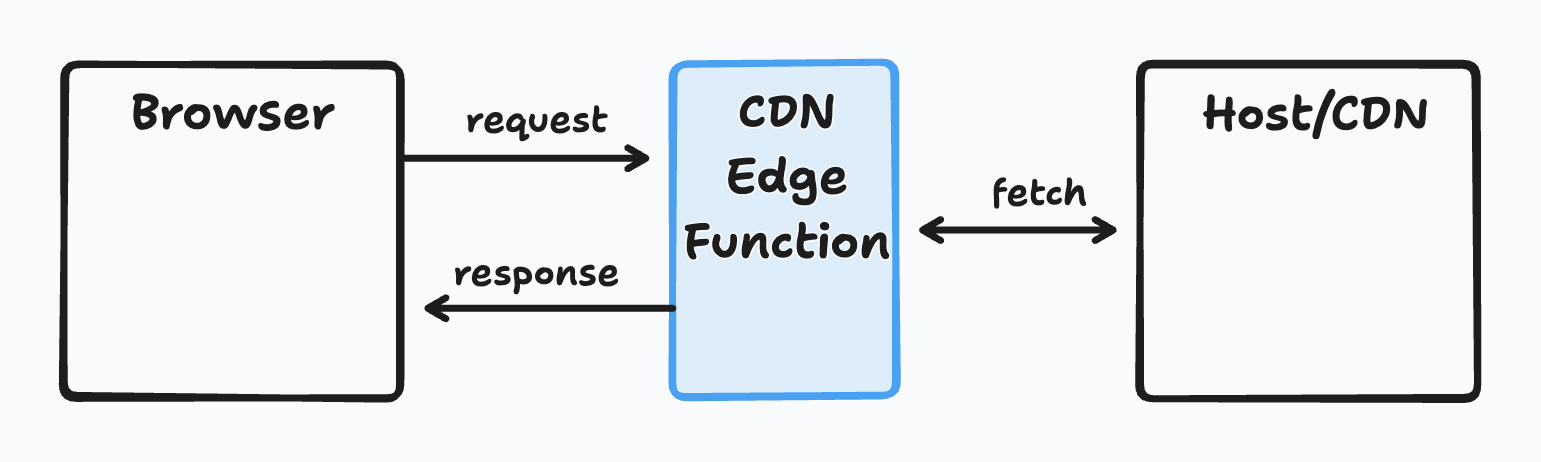
All of this work takes part in a Cloudflare Workers, meaning there is no JavaScript execution on the client device for any of this to happen.
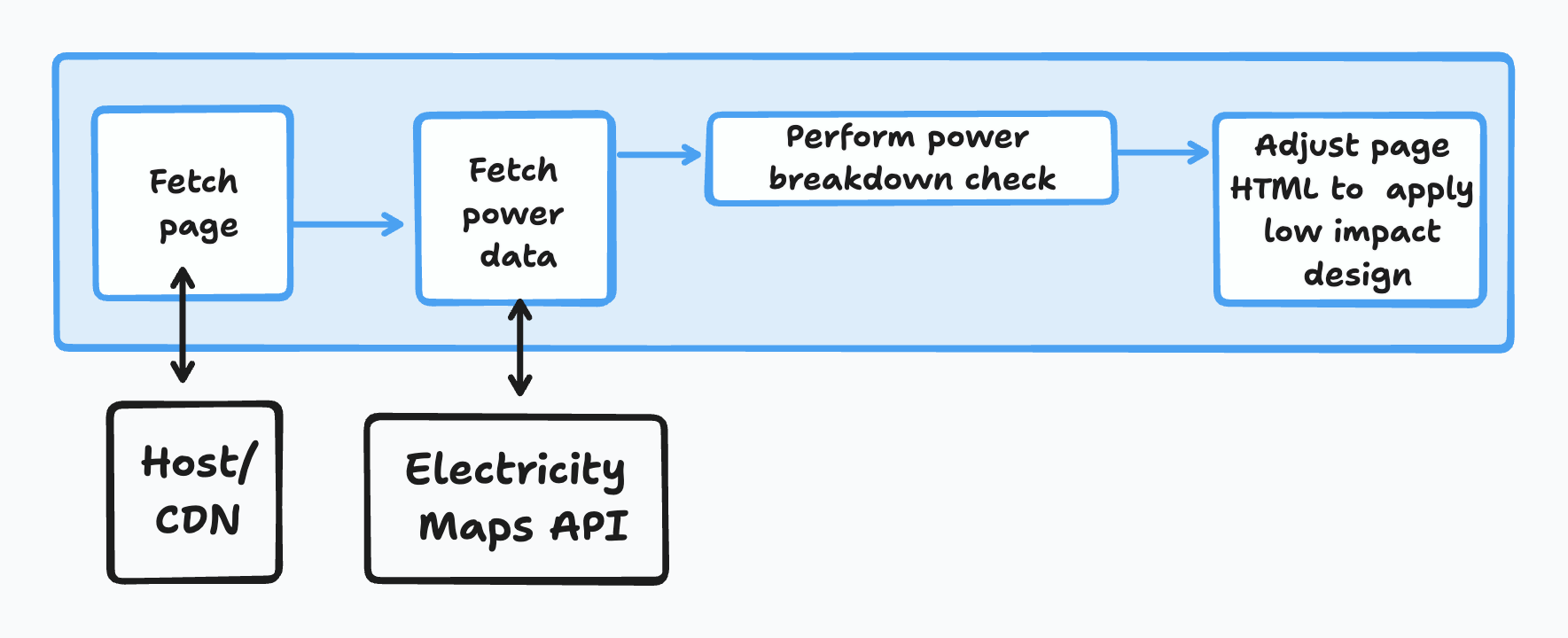
This is a simplified snippet from the Cloudflare Workers that works on this page.
// Import the things we need from the grid-aware-websites library
import { gridAwarePower } from '@greenweb/grid-aware-websites';
import { getLocation } from '@greenweb/gaw-plugin-cloudflare-workers';

export default {
    async fetch(request, env, ctx) {
        // First fetch the request
        const response = await fetch(request.url);
        // Then check if the request content type is HTML. If not, return the request as is.
        const contentType = response.headers.get('content-type');

        if (!contentType || !contentType.includes('text/html')) {
            return new Response(response.body, {
                ...response,
            });
        }

        // If the content type is HTML, we can then do the grid-aware checks, based on the user location.
        // Here we use the country, but you could also use lat-lon.
        let cfData = cloudflare.getLocation(request);
        let { country } = cfData;

        // If we can't get that information, return the response as it is.
        // We also add a header to the response to show that the country was not found. (optional)
        if (!country) {
            return new Response(response.body, {
                ...response,
                headers: {
                    ...response.headers,
                    'grid-aware': 'Error - Country not found',
                },
            });
        }

        // Fetch the grid data from Electricity Maps via the grid-aware-websites library
        const gridData = await gridAwarePower(country, 'AN_API_KEY_HERE');

        // If the grid data status is error, return the response as is.
        if (gridData.status === 'error') {
            return new Response(response.body, {
                ...response,
                headers: {
                    ...response.headers,
                    'grid-aware': 'Error - Unable to fetch grid data',
                },
            });
        }

        // If the gridAware value is set to true, we add a data-grid-aware attribute to the HTML tag of the page using the HTMLRewriter
        if (gridData.gridAware) {
            const rewriter = new HTMLRewriter()
                .on('html', {
                    element(element) {
                        element.setAttribute('data-grid-aware', 'true');
                    },
                })

                // ... Add more rewriter rules here. I have removed them for brevity.

            // Return the response with the rewriter applied
            // You can also return some of the grid-aware data in the headers of the response if you want.
            return new Response(rewriter.transform(response).body, {
                ...response,
                contentType: 'text/html',
                headers: {
                    ...response.headers,
                    'grid-aware': 'true',
                },
            });
        }


        // Otherwise, if the gridAware value is false, we return the response as is.
        // Again, we can add some headers to the response to show that the page is not grid-aware.
        return new Response(response.body, {
            ...response,
            contentType: 'text/html',
            headers: {
                ...response.headers,
                'grid-aware': 'false',
            },
        });
    },
};
Choose to view the demo for: